
Night Stand : Free Nokia Mobile Applications
Night Stand : Free Nokia Mobile Applications
Many programmers around that world have taken advantage of the Nokia 5800 XpressMusic phones’ built-in features. Unknown to many, when you purchase this gadget, it comes with some very valuable accessories that are usually sold separately – earphones, rubber casing and an extra stencil. One intriguing in particular is a phone stand which works just like the ones used to display plates on tables. OffScreen Technologies found a way to use this miniscule accessory and turn it into a necessity with the Night Stand.
What is the Night Stand application?
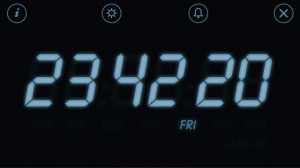
The Night Stand application turns your Nokia 5800 phone into a digital clock. The application displays time in hour, minute and second and is in a military time format. No AM or PM here. Below it displays the day of the week.
The screen will always be in landscape mode for a purpose. We’ll get to that later.
Above the screen are four icons. The “I” icon will display the “About Us” of the application. Next is the “Sun” icon, which toggles the display from, bright to dim. This would be good for people who don’t want the display too bright while they sleep at night. Also, this will be an energy-saving feature since you won’t be using much light. The third icon is the “Bell” which lets you set an alarm. Yes. This FREE application not only tells time but also can wake you up. We’ll tell you more about it later. Finally, the last icon is the good old “X” which turns off the application.
Let’s look into the “Bell” icon or the alarm feature. Just press it and you will be transported to alarm settings. You will know this when the digits start blinking. To change the time, simply tap the arrow up or arrow down buttons. Logically, the arrow up increases the time and the arrow down decreases it. You can set up the alarm to the last second. Once you’re ok with that, just press the “Bell” icon again and you are back to the normal screen. The alarm time will be displayed below the day of the week.
Please remember that you will still configure it in military time. When the alarm goes, it will give a normal buzzing sound. Sorry. You can’t customize the alarm sound.
Now, where does the stand come into play? When you are about to retire for the night, you can put your Nokia 5800 XpressMusic phone on top of your display. This will hold the phone and turns it into a digital display clock. Simple yet elegant. You can do this while it is charging, which we recommend.
My take on the Night Stand application
I love the fact that you can use the display accessory not just for watching videos. This just proves that the Nokia 5800 has so many potential uses and those who have a great imagination can see it.
Though we like the application, there are some improvements we still can see. One is to have an option to toggle between normal and military time formats. Another is to customize the alarm sound. Perhaps, we can also change the color of the display.
compatible with : Nokia N95, N96, Nokia 95 8gb, N96, N97 Touch UI, 5800 XpressMusic Touch OS, 5530, N91, N92, N93, N86, N85, N81, N82, N80, N79, N78, N77, N76, N75, N73, Nokia N71, E50, E51, E60, E61, E62, E63, E65, E66, E70, Nokia E71, E72, E75, E90, 6120
| Category: | Free Nokia Mobile Applications |
| Download: | Night Stand (360.31 kB) |
what peoble search for to get here:
- nokia e72 clock digital
- baixar night stand para o nokia 5530
- nokia mobil night stand
- nokia mobi/os/nightstand
Category: App Types, App vendor, Free Mobile Applications, Nokia Applications, Other Programs
Subscribe
If you enjoyed this article, subscribe to receive more just like it.


facebook comments:
good