
Antivirus Software And Security Application
Top 10 Antivirus Software And Security Application
1-Kaspersky Mobile Security
Greetings everyone! I brought you today one of the finest anti virus – anti theft engine for your smartphones. Yes, as the title suggest, I am precisely talking about Kaspersky Mobile Security 2008 for handhelds and mobile phones of the 3rd Edition. Even any PDA running on the windows mobile 5 and 6 are supported but I am not going to elaborate on that one. Why is it so that the buzz of mobile anti virus applications have been rising? Lately, most 3rd Edition symbian phones of Nokia, SonyEricsson, Motorola and LG have been hit by a wave of weird virus attack.
The virus apparently turns on your bluetooth signal, sends itself over other phones without you knowing about it. Also, in some instances it even keeps on restarting the phone over and over again without you having any control of it. What’s more worse is that it has been also reported that some phones are sending MMS and SMS to other devices that are already in the contact list without your consent! That really sucks!!!
To fight against that malware, virus and stealth worm the labs of Kaspersky have reintroduced their famous anti-virus engine with a new outlook and an even advanced Anti-Theft feature. What the anti-theft feature does is pretty exciting to say the very least. Imagine this scenario, your phone is stolen, hijacked or lost and you have no clue as to where it is and who is using it and with which number. What Anti-Theft can do is that it can securely and remotely delete all your personal info, sms, files etc from the device so that no one of your friends, family or colleagues gets harassed by this perpetrator!
Additionally it also sends a sms whenever your SIM card is changed and a new SIM card is inserted, what it includes in that SMS is the new number of that SIM card. All these happens from the background of the phone and the thief will have no idea that he is being played in his own game. To add to security, you can even send a command to the stolen or lost phone, your phone, that not to make the phone function unless the user enters a password set by you remotely, thus preventing it from being used completely by anyone unauthorized to do so.
With the anti-malware function that it also includes, the symbian mobile application also blocks all kinds of incoming adware, infected sms, and all other malicious files from being transferred over to your phone. When syncing your mobile phone with your desktop or laptop, it also ensures that even if your phone is pre-infected, your desktop or PC remains safe by not transferring the defected files. It also prevents viruses from dialing any numbers, which it might have done otherwise.
The anti virus and anti malware database can be updated accordingly to suit your needs, you can set it to automatically update everyday, every week or at your predefined days of the week or month. This will ensure that you remain safe from the latest worms and viruses throughout the years.
This super cool application is free to download, but all I ask of you is to subscribe to my RSS feed for free before downloading. The application is compatible with the latest NSeries, ESeries S60 mobile phones and smartphones of Nokia including, Nokia E51, E50, N73, N78, N96, N95, N91, 3250, N92, N93, N76, N71, N77, 6110, 6120, 5700, 5710, 5310, 5300, N80, E60, E61, N81, N82, E62, E65, E70 and E90 and probably more. It will also work with the newer versions of Nokia devices like the N97 and 5800 XpressMusic phones.
| Category: | Free Nokia Mobile Applications |
| Download: | Kaspersky Mobile Security (876.5 kB) |
——————————————————————————
2- ESET Mobile Security Beta v1.01

Public Beta 1 of ESET Mobile Security for Symbian and Windows Mobile, ESET’s antivirus software for mobile operating systems is now available for testing. This software includes the following new features and functionality.
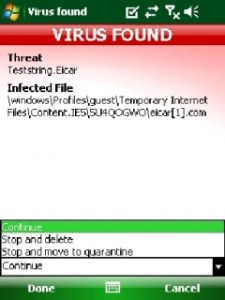
* Heuristics have been optimized for use on mobile platforms
* Infected files can be placed in a Quarantine folder, from which the user can then choose to restore or permanently delete them
* On-Demand scanning scans the entire device or specific folders
* Advanced On-Access scanning scans all created, used or incoming files
* Logs and statistics are in a more accessible format
* The user interface has been enhanced to promote ease of use with settings dialogs and an intuitive menu
Beta Considerations and Requirements:
The beta test version is a precursor of the final product without full functionality and documentation. It is intended for experienced users and should not be installed on operating systems or devices that perform critical tasks because it may cause errors or crashes.
The ESET Mobile Security Public Beta 1 software runs on Symbian S60 3rd Edition Feature Pack 1 or 2, Symbian S60 5th Edition and Windows Mobile versions 5.0, 6.0, 6.1 and 6.5.
| Category: | Free Nokia Mobile Application |
| Download: | ESET Mobile Security Beta v1.01For S60v5 (815.37 kB) |
——————————————————————————
3- BitDefender Mobile Security
BitDefender Mobile Security provides permanent antivirus protection for mobile devices running Symbian or Microsoft Windows Mobile. Relying on the valuable BitDefender experience in fighting computer threats, BitDefender Mobile Security is a light, easy to use instrument that will keep your mobile device on the move.
| Category: | Free Mobile Applications |
| Download: | BitDefender Mobile Security (113.46 KB) |
——————————————————————————
4- Guardian Mobile Platinum Edition
Greetings everyone! Wouldn’t you feel absolutely disgusted if your favorite cell phone was lost or hijacked when you were traveling? Maybe you just bought it a few days back and before you can even use it for a month, it’s stolen! Happened with me once upon a time with the Nokia N70 which was actually stolen by someone right out of my pocket during a major open air concert. I wish I was a blogger and true cell phone or symbian OS series 60 enthusiast because maybe I could get all my messages, images and music back!!!
So how?
Simple, with this latest premium release of the platinum edition of the standalone security focused mobile software Guardian Mobile for your Nokia cell phones you can be quite sure that you will be able to secure your data and maybe even locate the perpetrator within minutes from the incident!! For those who are still clueless about what exactly Guardian Anti Theft Mobile is, here is a quick overview:
Guardian Mobile is a must have smartphones application for any models of Nokia symbian smartphones and PDA.
Guardian Mobile is actually an anti theft Nokia software through which you can actually protect your smartphones data and other private stuff remotely.
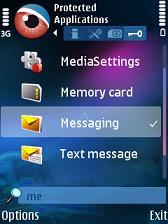
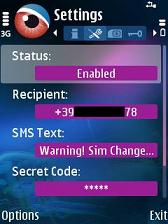
You can password protect and thus restrict access of your handhelds and mobile phone folders, your Nokia smartphones contacts, all the camera images and recorded videos etc among other things.
The latest version of Guardian Mobile also allows you to assign specific numbers to mark as safe when and if a SIM card is changed so that it actually does not block a valid and authorized user’s SIM card.
Guardian Mobile platinum edition for S60 Nokia devices will send a SMS periodically from the phone number of the thief without him knowing about it at all.
Guardian Mobile can also act as a big time “on hand problem” for the thief by just buzzing with its awkward and “alert” sound mode which, of course, you can set to occur if you want after the actual steal. This will make the thief go outta control and scared for sure. He might even get scared enough to return it to you himself.
Through the use of Guardian Mobile platinum edition with your Nokia phone, you can track and pinpoint the exact location where the phone is currently located through the use of an intuitive and integrated GPS map which is ported straight from the Google Mobile Maps repository, thus it is exact! (You can download and use Mobile Google Maps or MgMaps in this post of GPS applications collections which I posted in the past)
All you have to do as an end user is set up the number and the text, the restricted password and the folders you wish to save just after installing it. It does not consume any insane amount of memory and works in the background and probably you will just forget about it after the successful install because it is that simple, powerful and discreet!

This intelligent application is really one of the most important symbian application of our time and through this you can save a stitch which in turn will save nine, if you know what I mean. The core of this application is the hotkey access combinations that really have been well integrated. I have also included the user guide and the configuration handbook just in case you need a reference in the future. This kick ass Nokia 3rd edition application S60 powered application is compatible with all the N-Series and E-Series based mobile phones of Nokia.
The list includes 6110, 6121, 6124, N75, N85, N76, E62, E66, 3250, E65, 5320, 5500, 5700 XpressMusic, 5800 touch UI based Xpress Music, E71, E90, N71, N73, N95, N82, N81, N96, N77, N78, N92, N93, N81, N81 8Gb, N82, N91, N93i, 6210, 6220, E70, 6290, 6650, E50, N79, N80, E51, E60, E61, E61i, N95 8Gb, 6120, and Nokia N96. The updated version also works with any 5th edition touchscreen devices including Nokia N97, 5800 and 5530 XpressMusic.
All the major network carriers like Verizon Wireless, AT&T Wireless, T-Mobile, Orange Mobile UK, TeleSonera, Telstra, Nextel, Hutch, Cingular, Virgin, TIM Wireless, 3G Wireless, Airtel, Vodafone, Optimus, MTN Group etc are supported and should work independently with this application.
| Category: | Free Nokia Mobile Applications |
| Download: | Guardian Mobile Platinum Edition (1.11 MB) |
——————————————————————————
5- Advanced Secured Wallet
Advanced Secured Wallet is designed for personal use and allows you to store any kind of sensitive information into an internal secured database. You can store and protect your credit card numbers, internet accounts, pin codes, bank accounts and even contacts which needs to be secured. Any data written to the database is encrypted using symmetric key ciphering. You must also enter a password to be able to use the software.
Supplemental facilities like making phone calls for the selected contact or card, sending normal or direct SMS, send e-mails or connect to web are provided for an easy use of the software.
Advanced Secured Wallet manages its internal database using folders and cards. A folder may contain one or more cards. A card is a record in the database and it stores your personal information. You can add, edit, rename or delete an unlimited number of cards and folders. A card may contain one or more details. The database contains a predefined number of card templates which you may directly use or you can define your own custom card with any number of details.
The interface is very similar with the phone’s built-in Contacts phonebook application and for this reason the Advanced Secured Wallet software can be successfully used to store, use and manage encrypted contacts. While you are browsing the database, all information is stored encrypted. It is decrypted only there is the need to display on the screen. The password is also stored in encrypted format and hashed using digest algorithms. This provides you a maximum security for your information against of the hacking software if any.
Advanced Secured Wallet has also facilities to make phone calls or send SMS messages using phone’s normal messaging system or using the custom Direct SMS option. When you send a message using the Direct SMS command, your message will be directly sent to the phone number you specify but the message will not be stored anywhere in the phone’s Messaging database. When sending SMS, please note it will not be encrypted over the air and SMS logs may still be written in the phone’s built-in Logs application. For making phone calls you can also press the GREEN key when a card is selected.
* IMPORTANT: Your password is used to encrypt the database’s folders and cards. The password is not stored in the database nor anywhere on the phone’s disks. Try not to forget the password. There is no back-door to recover the password.
Nokia’s Symbian S60 3rd edition based mobile phones:
3250, 5300, 5320 XM, 5700, 5700 XM, 6110, 6120c, 6121c, 6124c, 6210, 6220c, 6290, 6650, E50, E51, E60, E61, E61i, E62, E63, E66, E70, E71, E90, ,N70, N71, N73, N75, N76, N77, N78, N79, N81, N81 8GB, N82, N85, N90, N91, N92, N93, N93i, N95, N95, N95 8GB, N96
| Category: | Free Nokia Mobile Applications |
| Download: | Advanced Secured Wallet (837.61 kB) |
——————————————————————————
6- MediaSafe v2.08
screenshot0096ys5
Media Safe software for Series 60 mobile phones allows you to store media files encrypted and password protected. You can store important Photo, Audio, Video and Note files secure on your mobile phone. Media Safe uses advanced cryptography methods to protect your media files. The program has friendly and fully customizable user interface.
Main features of Media Safe:
-Ability to encrypt and store media files of different types: Images, Sounds, Videos and Notes.
-Strong and fast data encryption (BLOWFISH and SHA1), which provides ultimate security.
-Improved security system that encrypts file/folder names as well as the file content.
-Comfortable and customizable user interface.
-MMC support.
-Scalable user interface
-Ability to import multiple files with one operation
-Predefined short-cut keys for the most common operations
First time, when you start the Media Safe program, you must set the password. After that, every time you start the Media Safe, you must enter the password to access media files stored into the program.
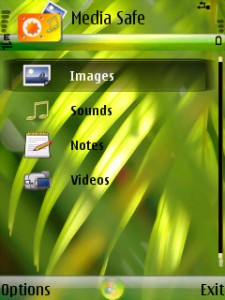
On the main screen 4 different stores will be listed:
-Images
-Sounds
-Notes
-Videos
Use appropriate store for the specific media files.
To import and encrypt media file go to the Options menu and choose Import command. To return the file to the original location use Options > Return command. Media Safe offers enhanced browsing capabilities. Images file store layout can be customized by choosing List/Grid view in menu or in settings dialog. Sounds/Videos layout is also customizable.
The Registration
Code is 0000
Media Safe software for Series 60 mobile phones allows you to store media files encrypted and password protected. You can store important Photo, Audio, Video and Note files secure on your mobile phone. Media Safe uses advanced cryptography methods to protect your media files. The program has friendly and fully customizable user interface.
Main features of Media Safe:
-Ability to encrypt and store media files of different types: Images, Sounds, Videos and Notes.
-Strong and fast data encryption (BLOWFISH and SHA1), which provides ultimate security.
-Improved security system that encrypts file/folder names as well as the file content.
-Comfortable and customizable user interface.
-MMC support.
-Scalable user interface
-Ability to import multiple files with one operation
-Predefined short-cut keys for the most common operations
First time, when you start the Media Safe program, you must set the password. After that, every time you start the Media Safe, you must enter the password to access media files stored into the program.
On the main screen 4 different stores will be listed:
-Images
-Sounds
-Notes
-Videos
Use appropriate store for the specific media files.
To import and encrypt media file go to the Options menu and choose Import command. To return the file to the original location use Options > Return command. Media Safe offers enhanced browsing capabilities. Images file store layout can be customized by choosing List/Grid view in menu or in settings dialog. Sounds/Videos layout is also customizable.
| Category: | Free Nokia Mobile Applications |
| Download: | MediaSafe v2.08 (264.55 kB) |
——————————————————————————
7- Anti-Theft
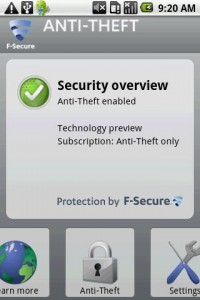
With F-Secure Anti-Theft for Mobile you can be sure that your personal and confidential information won ’t be misused by anyone. – Lock your phone remotely via SMS – Erase the confidential data remotely via SMS – Get informed who stole your phone – Locate your phone – Easy to upgrade with additional security features directly via mobile,
Features:
#LOCK# – REMOTE LOCK YOUR PHONE
Ok, you lost your phone – lock it quickly with single SMS message! The phone stays locked until you get it back and enter the right password.
Send text message: #lock# to your phone to lock it
#WIPE# – REMOTE WIPE YOUR PHONE
If it looks like you won’t be getting your phone back you have one more trick up your sleeve – erase all your confidential data. the thief is left with just the covers without of the content.
Send the text message: #wipe# to your phone to wipe it.
#LOCATE# – LOCATE YOUR MISSING PHONE
How do you locate your lost phone or the person who has it? It’s simple – use locate and see it on a map. It’s as easy as that!
Send text message: #locate# to your phone to see its location on a map.
THEFT CONTROL
Want to nab the thief? If someone steals your phone and changes the sim card, the phone locks down automatically and the thief’s phone number is reported to you. This feature works automatically when it’s activated.
| Category: | Free Nokia Mobile Applications |
| Download: | Anti-Theft (1.72 MB) |
——————————————————————————
8- Safety Manager Software
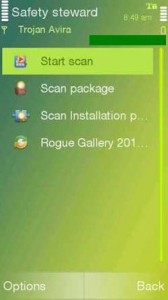
Safety Manager is a security software that protects your mobile device.
Functions:
* application manager
* process manager
* internet manager
* reject log
* privacy list
* blacklist & whitelist
* call assistant
* system optimize
* advance tools
* safe mode
* interception record
* security guard
Shortcuts in program (n=no, y=yes)
| Category: | Free Nokia Mobile Applications |
| Download: | Safety Manager Software (863.19 kB) |
——————————————————————————
9- Data Security And Recovery
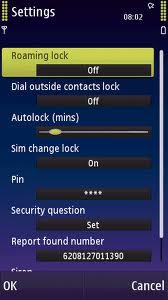
Anti Theft security application which has remote lock, intelligent locking, location and device recovery system built in. Lock by text even after sim change, locks on phone behaviour, maps device and makes it easy for a finder to report your found phone to you.
Main Features:
Remote and Automatic Locking: Full screen lock will disable the phone completely making it unusable until unlocked.
Sim Change Locking: The phone will lock and remain locked even if the sim card is changed.
SMS Locking: Use a friends phone to text your lock code to your phone to remotely lock.
Device Scream: Makes the phone a risk to handle and attracts attention for detterant.
Location Mapping: GPS and celltower tracking will help to locate the missing or stolen phone.
Contact Backup: Phone contact backup and restore allows you to recover vital data incase of loss or theft.
| Category: | Free Nokia Mobile Applications |
| Download: | Data Security And Recovery (129.16 kB) |
——————————————————————————
10-Evernote beta S60v5

n case you are not familiar with Evernote, here is a bit of an introduction. Evernote is used to capture thoughts, ideas, tasks, business cards, plane tickets, meeting notes, websites, and just about anything you want captured, stored, and made searchable in the future. There are desktop clients for Mac and Windows, along with mobile clients for iPhone, Windows Mobile, WebOS, Android, and BlackBerry devices.
There are free and premium (this is what I pay for) options for Evernote and I imagine that most people can get by just fine with a free account. I think the product is so compelling and useful that I want to support them with my money even if I don’t use all the features of the premium service. The premium services is $45 per year and gives you 500MB of uploads per month, more file upload support, advanced collaboration, and enhanced security. Premium accounts are also free of promotions and ads that may appear on free accounts.
Before today I have been able to get notes into Evernote by taking photos of business cards, handwritten notes, documents, signs, etc. and emailing them to my special Evernote email address. I could then use the web interface to try to search and view notes, but it definitely was not a clean and simple solution. With Evernote Mobile for the N97 (should work on all S60 5th Edition devices) you can create new text, snapshot (photo), and audio notes and upload files to your Evernote account. The only other client I have seen with File support isWindows Mobile since the iPhone has no directory/file access and is locked down.
With the text note creation you will see fields for a note title, what notebook you want to upload to, any tags you want to assign to the note, and the actual note text field. After taking a photo and recording an audio clip
you will then be taken back to a field to enter some text into the snapshot or audio note. There are discard and save buttons at the bottom to upload notes or cancel them if you change your mind. BTW, you can create text notes and snapshot notes offline with this client in case you are out of signal range and want to create a new note.
| Category: | Free Mobile Applications |
| Download: | Evernote beta S60v5 (2.05 MB) |
Category: Antivirus, App Types, App vendor, Free Mobile Applications, Nokia Applications, Top 10
Subscribe
If you enjoyed this article, subscribe to receive more just like it.


